Why Every Small Business Needs a Google Business Profile
What Is a Google Business Profile?
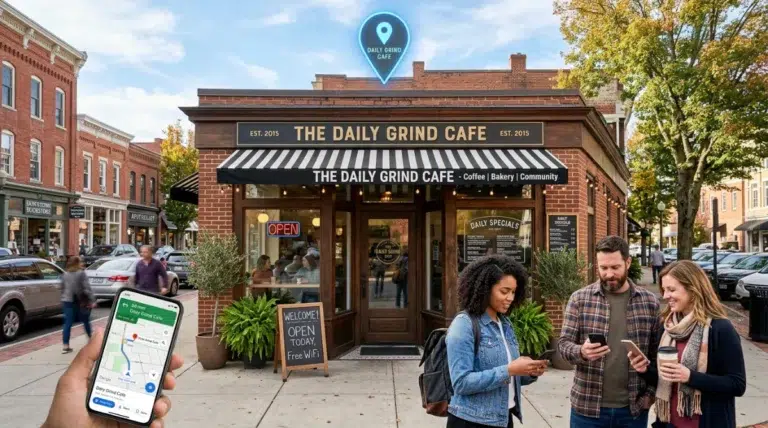
A Google Business Profile (formerly called Google My Business) is a free tool that allows your business to appear on Google Search and Google Maps.
When someone searches for your business name — or services like “plumber near me” or “nonprofit in Albany” — your profile can show:
- Your business name
- Phone number
- Address
- Website link
- Hours of operation
- Reviews
- Photos
- Directions
- Frequently asked questions
It is often the first thing people see before they visit your website.
Why Google Business Profile Is So Important for Small Businesses
Many small businesses focus only on their website. But in reality, your Google profile may get more views than your homepage.
Here’s why it matters.
1. It Increases Local Visibility
When people search for services in your area, Google shows a “map pack” at the top of results. This section highlights three local businesses. If your profile is optimized, you can appear there — even above larger competitors. That means more visibility without paying for ads.
2. It Builds Instant Trust
Customers trust businesses that have:
- Clear contact information
- Updated hours
- Real reviews
- Photos of real work
A strong profile makes your business look active and professional. Even offline businesses benefit because customers check online before visiting.
3. It Increases Calls and Walk-Ins
Google profiles allow users to:
- Call your business directly
- Click for directions
- Visit your website
- Message you
For local service providers, this can lead directly to new appointments and inquiries.
4. It Helps You Compete With Bigger Businesses
You don’t need a massive marketing budget to rank locally. A well-optimized profile can outperform larger companies that neglect theirs. Consistency and activity matter more than size.
5. It Supports Both Online and Offline Businesses
If you have a physical location, your profile helps customers find you. If you operate online or from home, you can still set up a service-area profile and show where you work.It works for:
- Nonprofits
- Consultants
- Contractors
- Retail shops
- Online service providers
- Home-based businesses
How to Set Up a Google Business Profile (Step-by-Step)
Setting up your profile is free and straightforward.
Step 1: Go to Google Business Profile
Visit: https://www.google.com/business
Click “Manage Now.” Sign in using your Google account.
Step 2: Enter Your Business Name
Type your business name exactly as it appears on your website and legal documents.
Step 3: Choose the Right Business Category
This is critical.
Select the category that best describes your main service.
For example:
- Web Designer
- Nonprofit Organization
- HVAC Contractor
- Consultant
You can add secondary categories later. Choosing the right category improves search visibility.
Step 4: Add Your Location or Service Area
If you have a storefront:
- Enter your physical address.
- If you serve customers at their location:
- Select “I deliver goods and services to my customers” and list your service areas.
Step 5: Add Contact Information
Include:
- Phone number
- Website URL
- Business hours
Make sure this matches your website exactly. Inconsistent information can hurt rankings.
Step 6: Verify Your Business
Google will ask you to verify ownership.
Verification methods may include:
- Postcard mailed to your address
- Phone call
- Video verification
Follow the instructions carefully. Once verified, your profile becomes active.
How to Optimize Your Google Business Profile
Setting it up is only the beginning. To get real results, you must optimize it.
1. Add High-Quality Photos
Upload:
- Exterior photos
- Interior photos
- Team photos
- Product or service photos
Businesses with photos receive more engagement.
2. Write a Clear Business Description
Explain:
- What you do
- Who you serve
- What makes you different
Keep it simple and customer-focused.
3. Collect Reviews
Ask happy customers to leave honest reviews. Respond to every review — positive or negative. Reviews are one of the strongest ranking factors.
4. Post Regular Updates
Google allows you to post updates similar to social media posts.
You can share:
- Promotions
- New blog posts
- Announcements
- Events
Regular activity signals that your business is active.
5. Answer Questions in the Q&A Section
Monitor your profile for questions. Provide clear answers quickly. This improves trust and engagement.
How Google Business Profile Benefits Offline Businesses
If you operate a physical location, your profile:
- Drives foot traffic
- Shows directions instantly
- Displays busy hours
- Highlights reviews before someone visits
Many customers decide where to go based on reviews alone.
How It Benefits Online or Service-Based Businesses
Even if you don’t have a storefront, your profile:
- Helps you rank locally
- Builds credibility
- Generates calls
- Strengthens brand authority
Many service providers receive direct leads from Google without paid ads.
Common Mistakes to Avoid
Avoid:
- Inconsistent contact information
- Keyword stuffing in business name
- Ignoring reviews
- Letting hours go outdated
- Posting once and forgetting it
- Posting too many reviews in one day
Consistency builds ranking strength over time.
Is Google Business Profile Really Worth It?
Yes, and it’s free. It increases visibility, and it builds trust.
It drives direct action. And for many small businesses, it delivers a higher return than social media marketing.
Need Help Optimizing Your Profile?
If you’re unsure whether your Google profile is set up correctly — or you want to improve your visibility — a strategy session can help identify opportunities. Sometimes small adjustments lead to major visibility improvements.